

VFX Production Tracking Software for Studios
Track every shot, artist and deadline in one Windows app. Assign roto, paint and comp work, log artist time, run reviews, manage outsourced shots and see exactly what is late before your client does.
- Roto · Paint · Comp · Match Move · 3D
- Supervisors, coordinators & artists
- In-house and outsourced work
- Built in Chennai, India
Everything a VFX production team needs to deliver on time
Spreadsheets and chat groups break down once you have hundreds of shots across several projects. ShotLead keeps shots, people, time, notes and deadlines in one place, so coordinators stop chasing and supervisors see the real status at a glance.
Shot & sequence tracking
Every shot with its reel or sequence, frames, man-days, version, client ETA and status, with thumbnails and colour-coded overdue dates.
Task assignment by department
Assign COMP, PAINT, ROTO, MATCH MOVE, 3D and other work to artists, with per-department status on every shot.
Artist time & man-day tracking
Artists log time against their tasks. Compare hours logged with man-days planned, per shot, per artist and per month.
Review & approval workflow
Submitted for review, approved, completed or kickback: supervisors see what is waiting and sign off from one screen.
Feedback, annotations & queries
Internal feedback, client feedback, annotations and queries live inside each shot, so notes never get lost in email.
Client ETA & overdue alerts
Today's ETA shots, overdue shots and artist ETAs, with how late each shot is and who is on it.
Outsourcing & vendor management
Send shots to partner studios or freelancers, track them by client ETA month and keep a vendor scorecard.
Reports with insights
Monthly work reports, artist performance, overdue and artist-ETA reports, with automatic insights and CSV / Excel export.
Play in RV & shared-drive paths
Link each shot's EXR folder and QT / MOV file on your shared drive and open them in RV with one click.
See ShotLead in action
Real screens from the ShotLead desktop app. Click any screenshot to view it full size.
Your whole studio on one screen
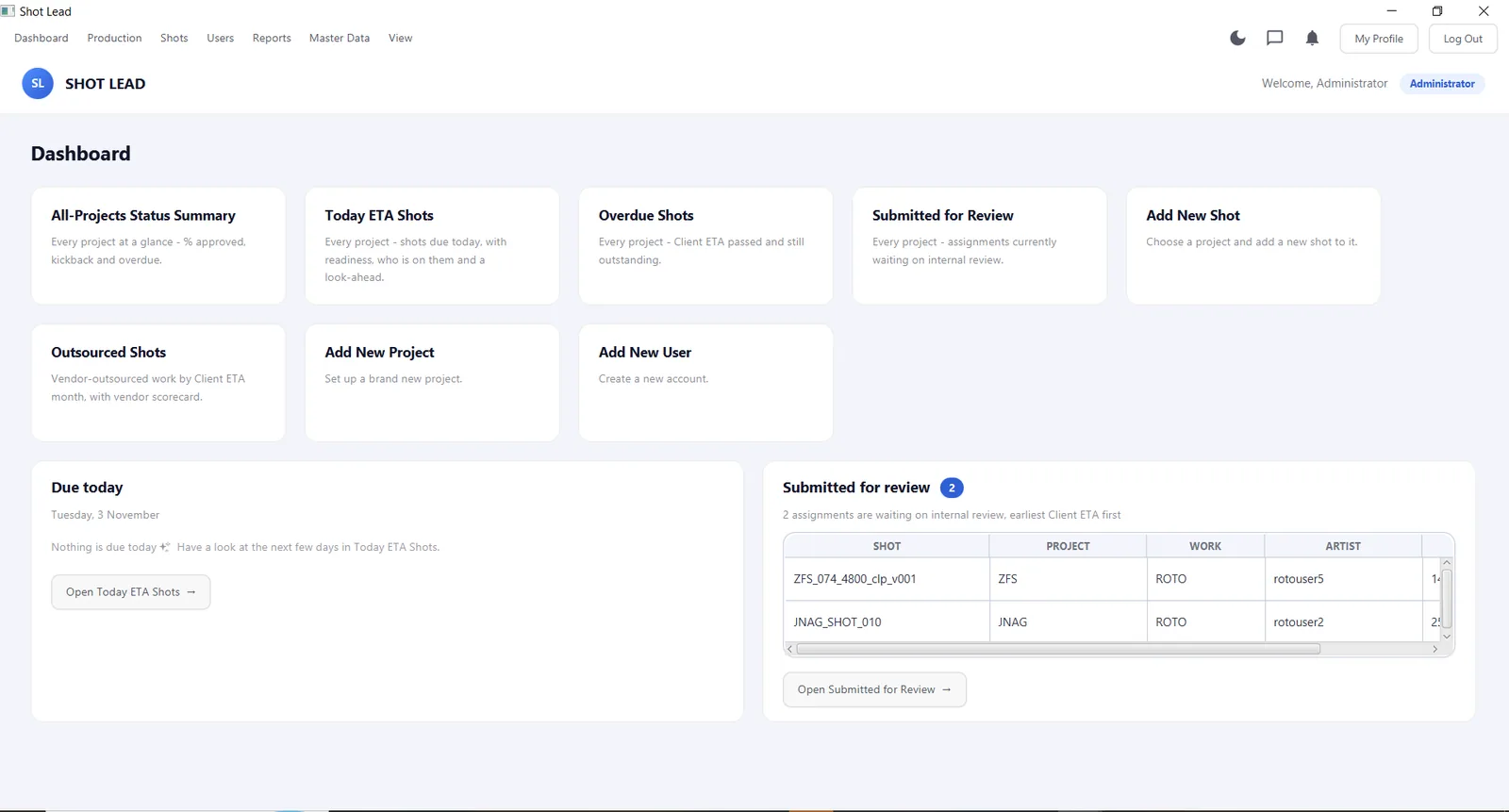
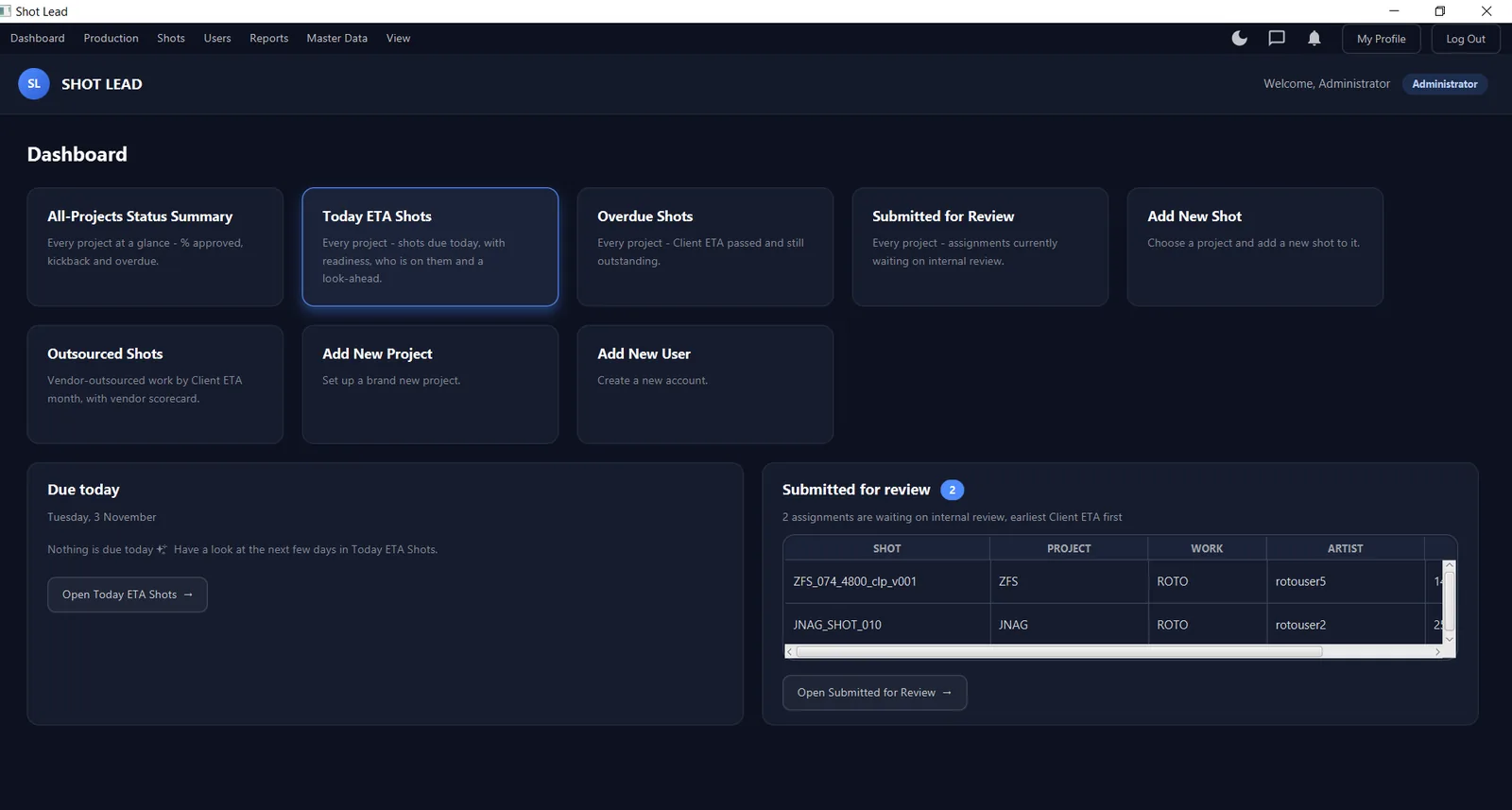
The dashboard opens with what needs attention today, across every project.
- All-projects status summary: % approved, kickbacks and overdue
- Today's ETA shots with readiness and who is on them
- Overdue shots, and work submitted for review
- Quick actions to add projects, shots and users
- Light and dark mode for long sessions
Every project, client and deadline
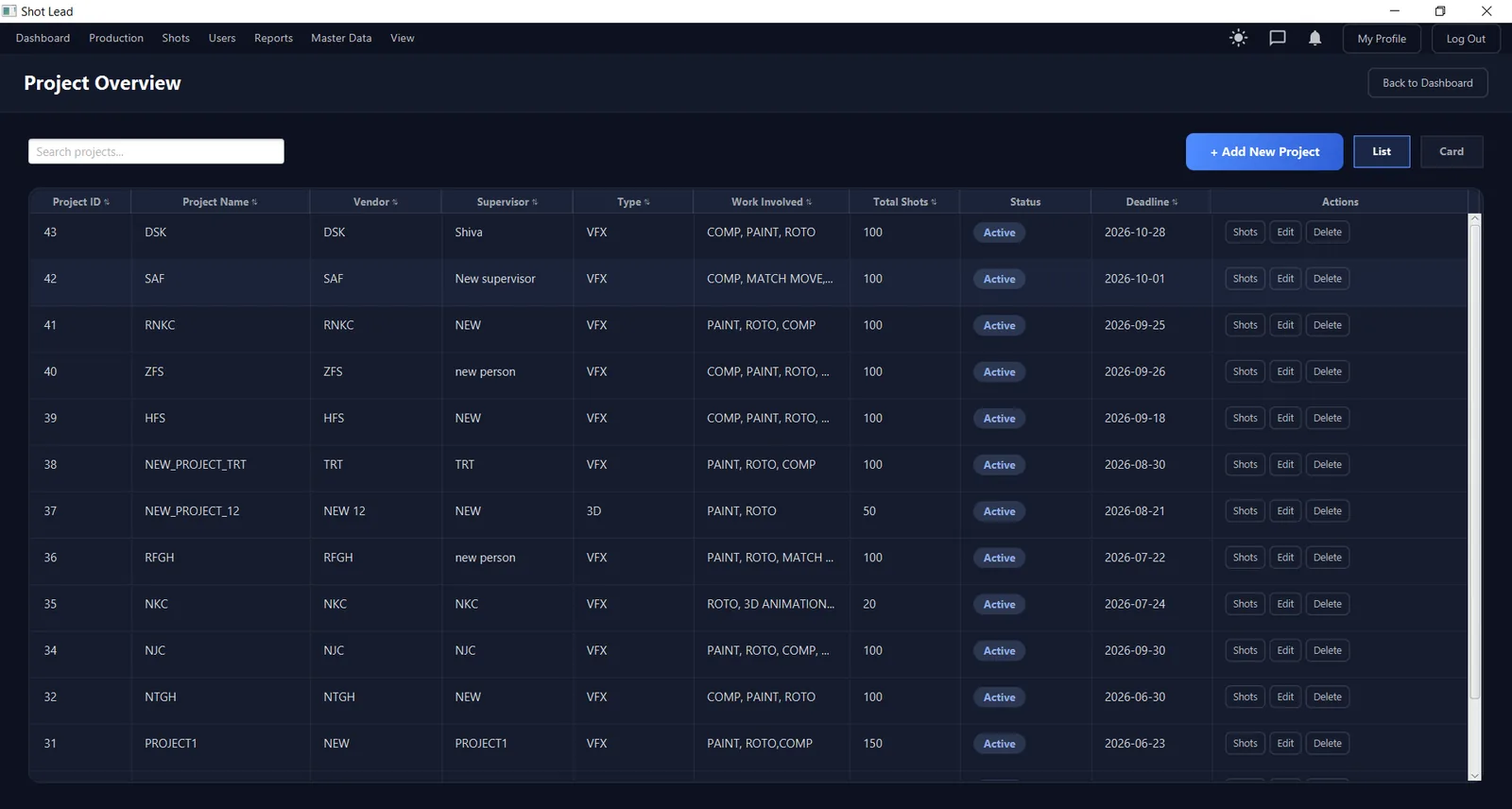
Project Overview lists all active work with the details your production team asks about most.
- Vendor / client, supervisor and project type (VFX, 3D)
- Work involved: COMP, PAINT, ROTO, MATCH MOVE, 3D animation
- Total shots, status and deadline at a glance
- List and card views, search and sorting
Track hundreds of shots without a spreadsheet
The shot list shows the full picture for a project, grouped by reel or sequence.
- Thumbnail, sequence, client ETA, frames, man-days and version
- Per-department columns showing who is assigned and their status
- Unassigned and overdue counts, with overdue ETAs highlighted
- Filter by status, sequence, work, artist, ETA and sourcing
- Compact view, column chooser and Export to Excel
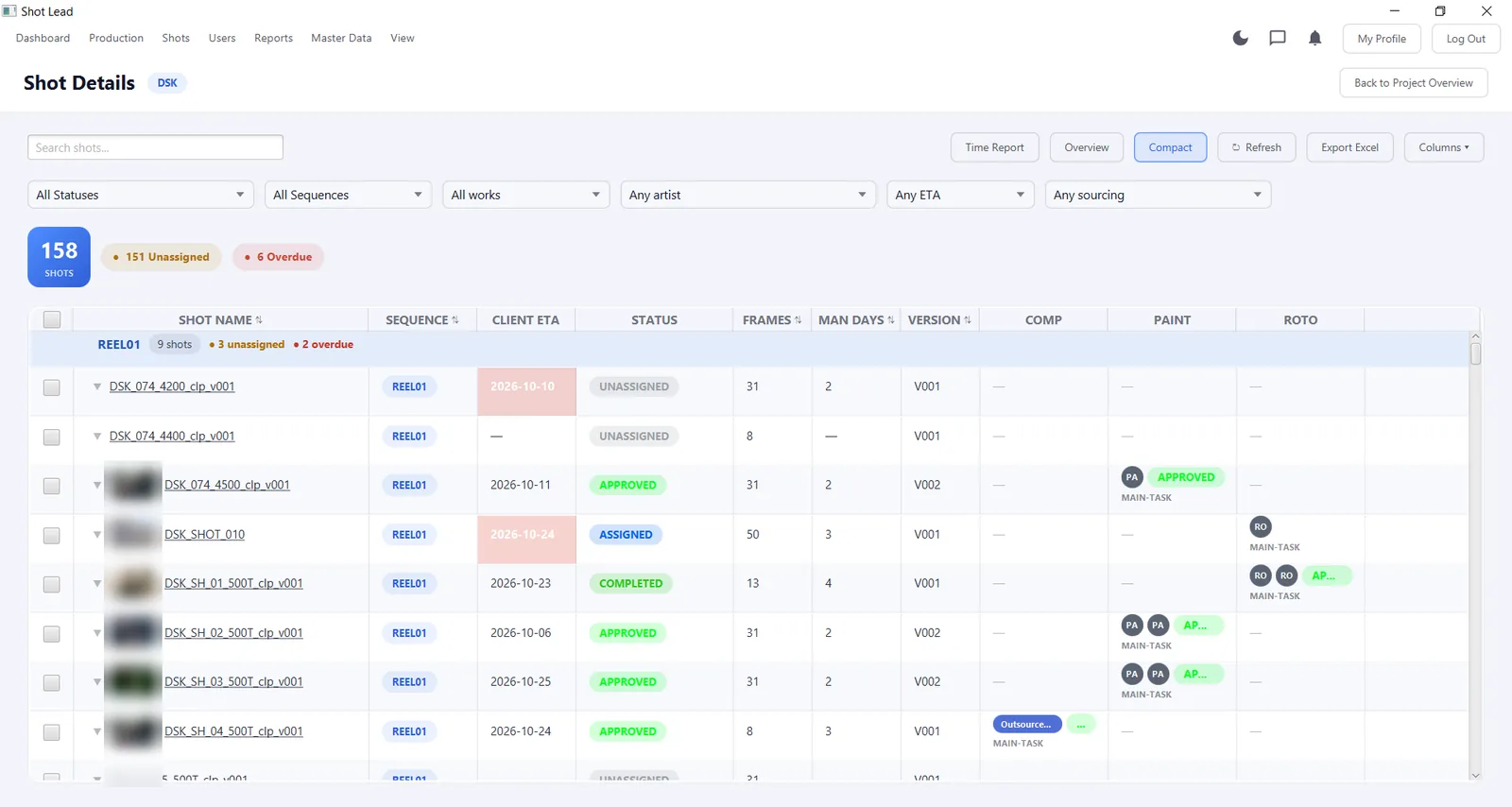
Client footage thumbnails are blurred on this page.
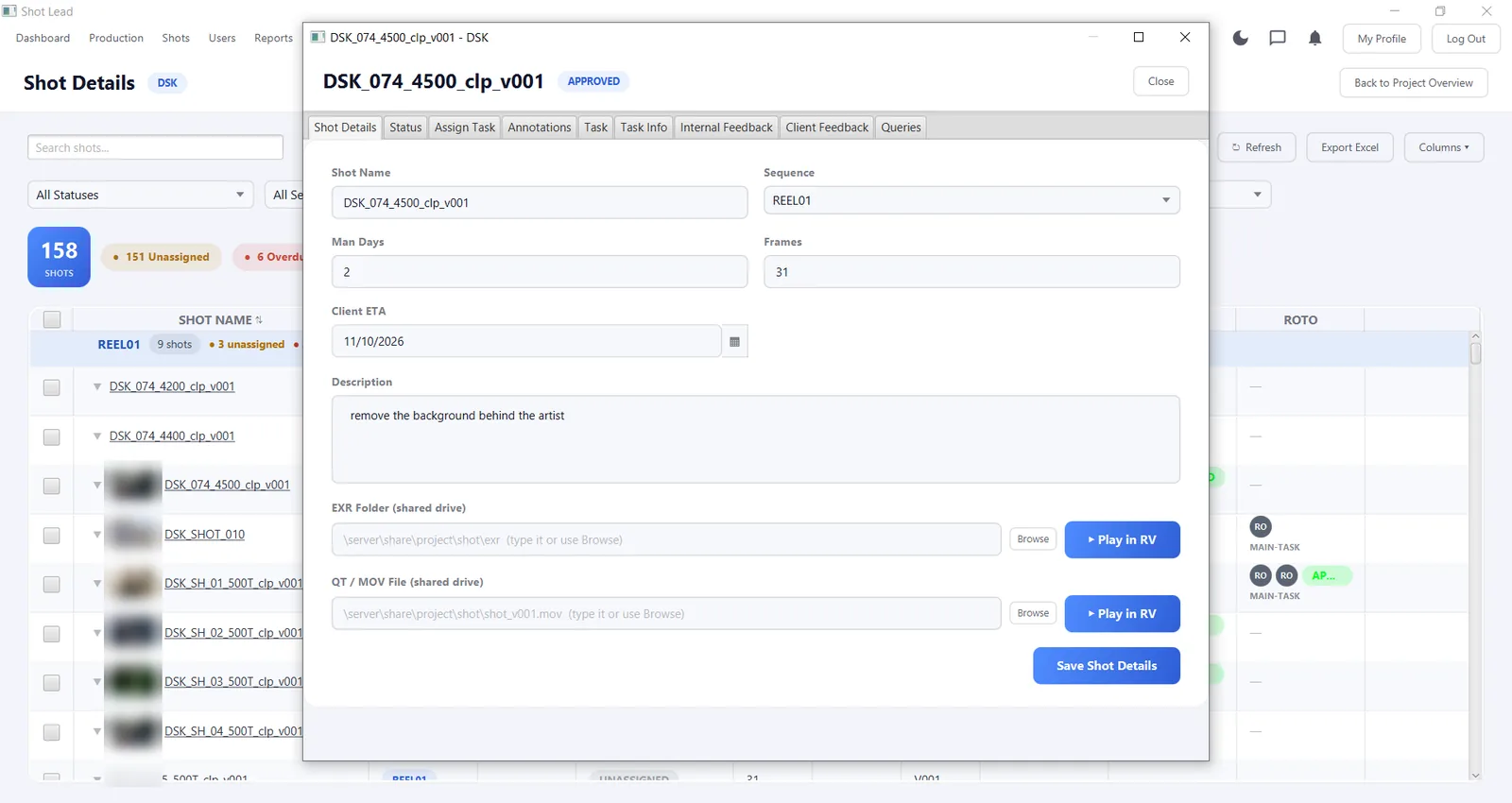
Everything about a shot in one window
Open any shot to edit details, assign work and keep all communication together.
- Tabs for details, status, task assignment and task info
- Annotations, internal feedback, client feedback and queries
- Overall shot status plus a separate status for each work type
- EXR folder and QT / MOV paths on your shared drive
- One-click Play in RV for quick review
Outsource work and keep control
Many studios share work with partner studios and freelancers. ShotLead tracks that work as carefully as your in-house shots.
- Vendor master: organisations and freelancers with contact details
- Mark a department's work as outsourced on any shot
- Outsourced shots listed by client ETA month
- Vendor scorecard, and outsourced work shown separately in reports
- Master Data for statuses, departments, tasks and task types
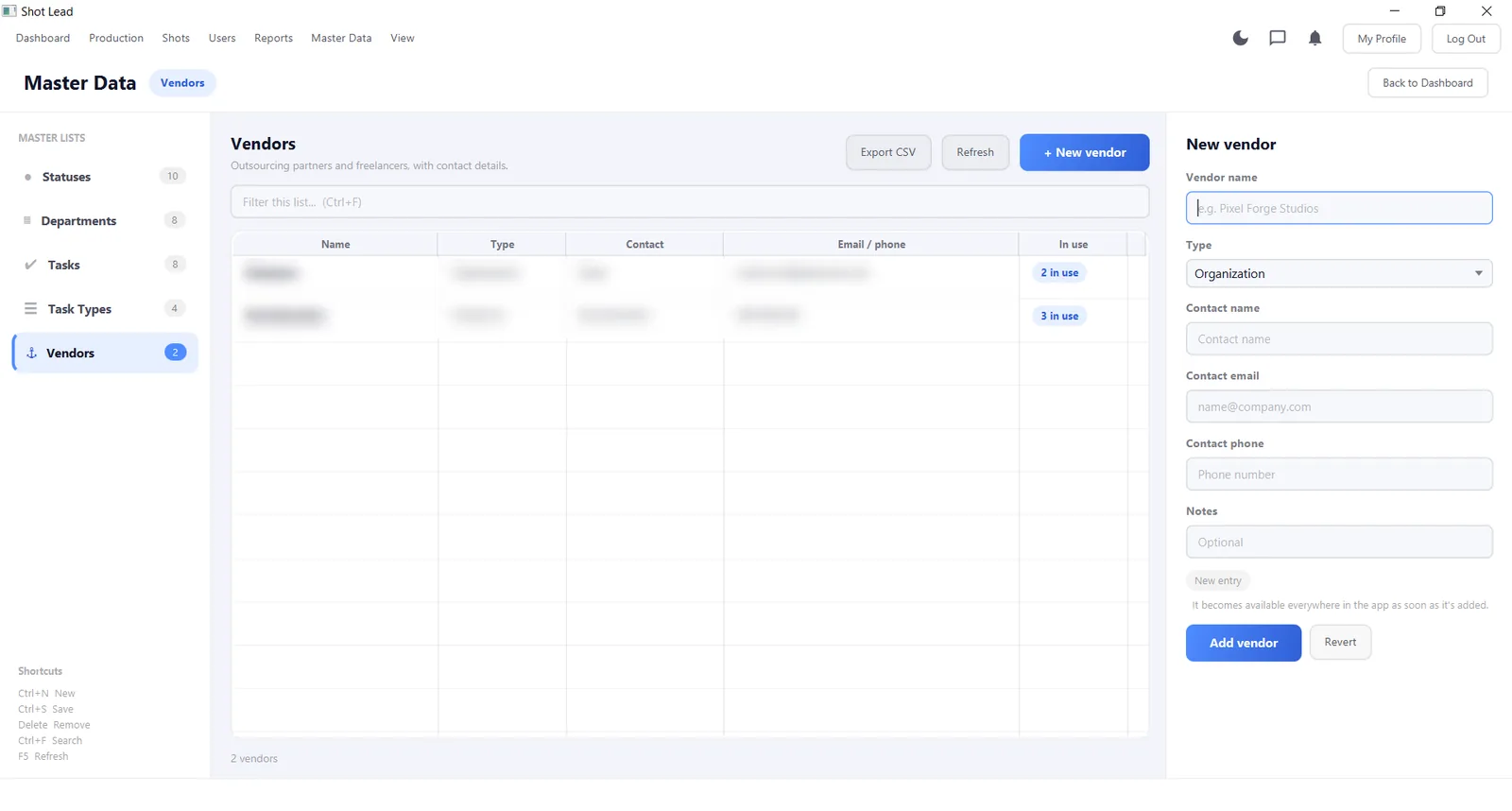
Vendor contact details are blurred on this page.
From new project to client delivery
ShotLead follows the way VFX work actually moves through a studio.
Create the project
Client, supervisor, type, work involved and deadline.
Add shots
Reel or sequence, frames, man-days, client ETA and brief.
Assign work
Give roto, paint or comp tasks to artists or outsource them.
Artists work & log time
Time is logged against each task as artists work.
Review
Supervisors approve, or send a kickback with feedback.
Deliver & report
Close shots, then review hours, man-days and lateness.
Know where your hours and man-days really go
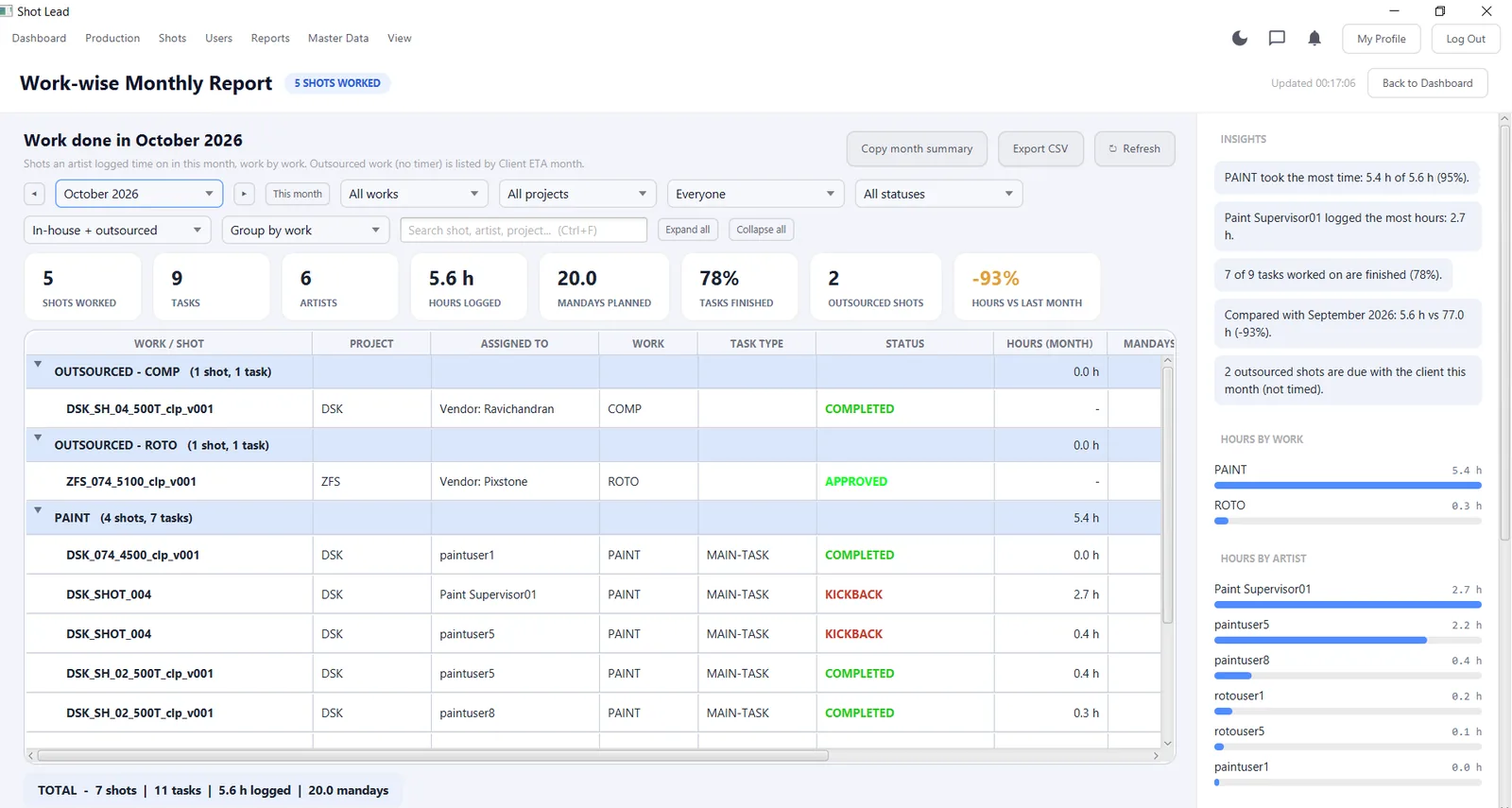
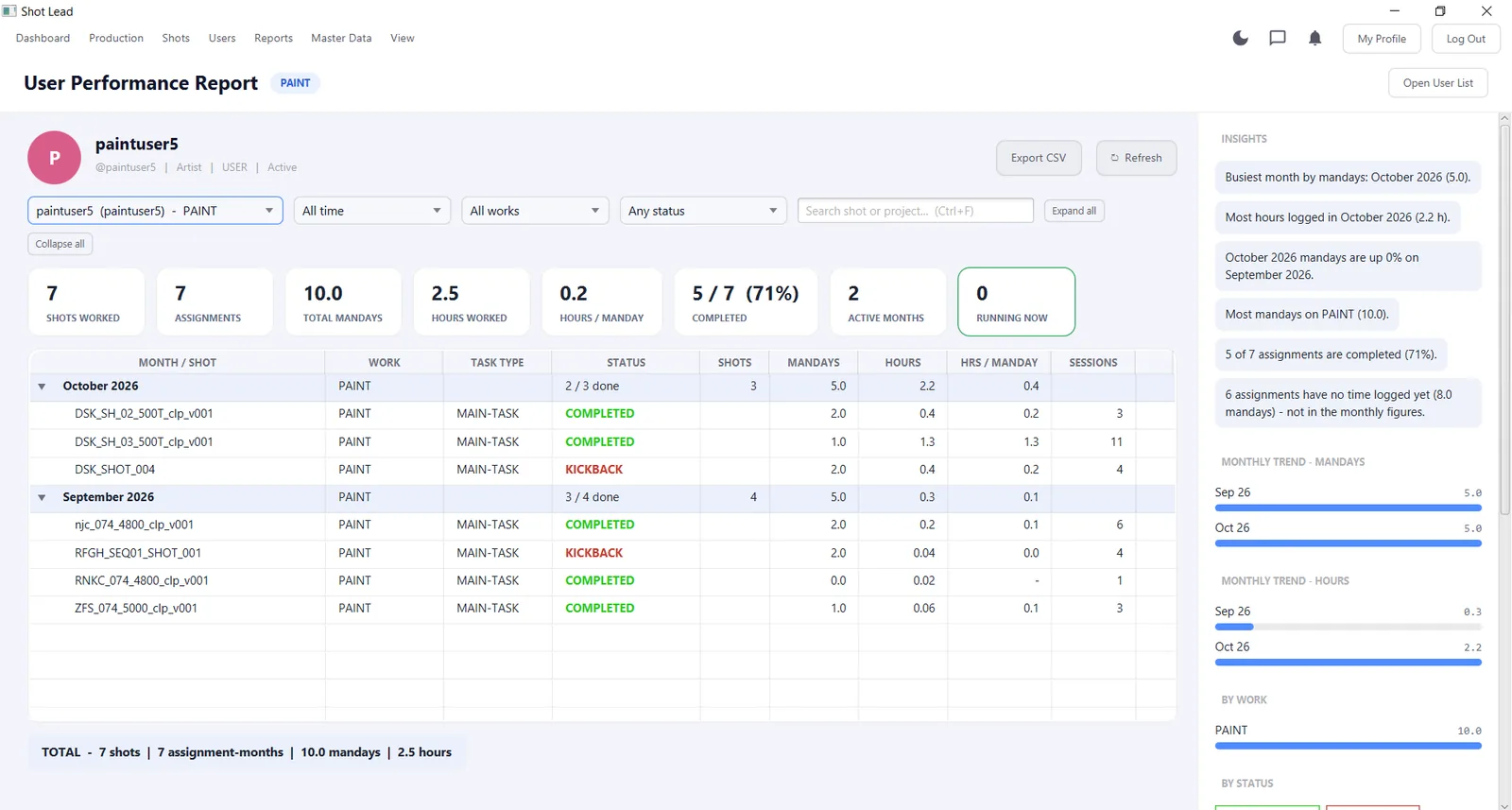
Every report has filters, totals, one-click export and an Insights panel that points out what matters, such as which work took the most time or which artist has the most overdue tasks.
Work-wise Monthly Report
Shots worked, tasks, artists, hours logged, man-days planned, tasks finished and hours compared with last month, grouped by work type.
Artist Performance Report
Shots, assignments, man-days, hours per man-day and completion rate for each artist, with monthly trends.
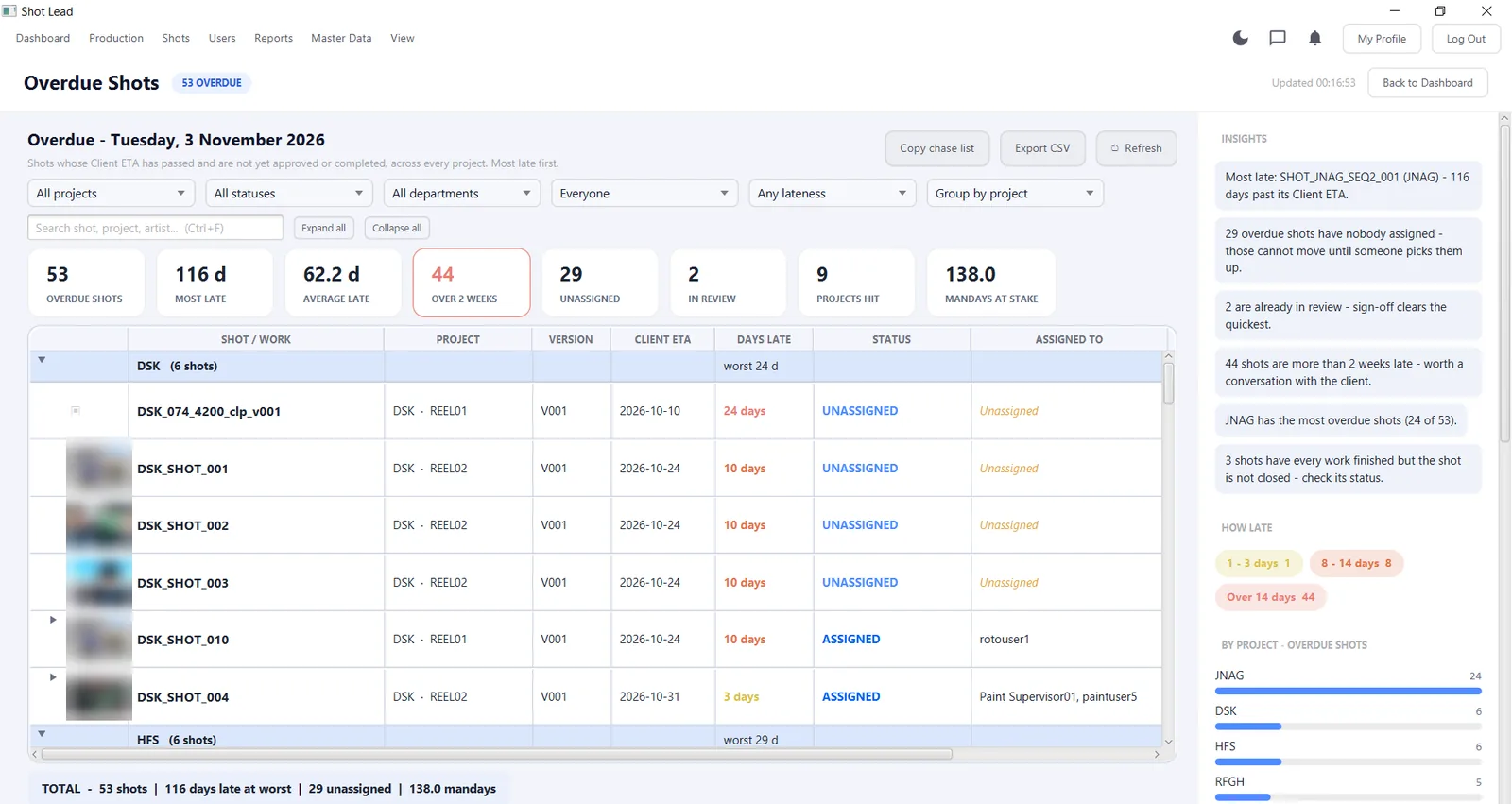
Overdue Shots
Every shot past its client ETA, how many days late, who is assigned and the man-days at stake, with a copyable chase list.
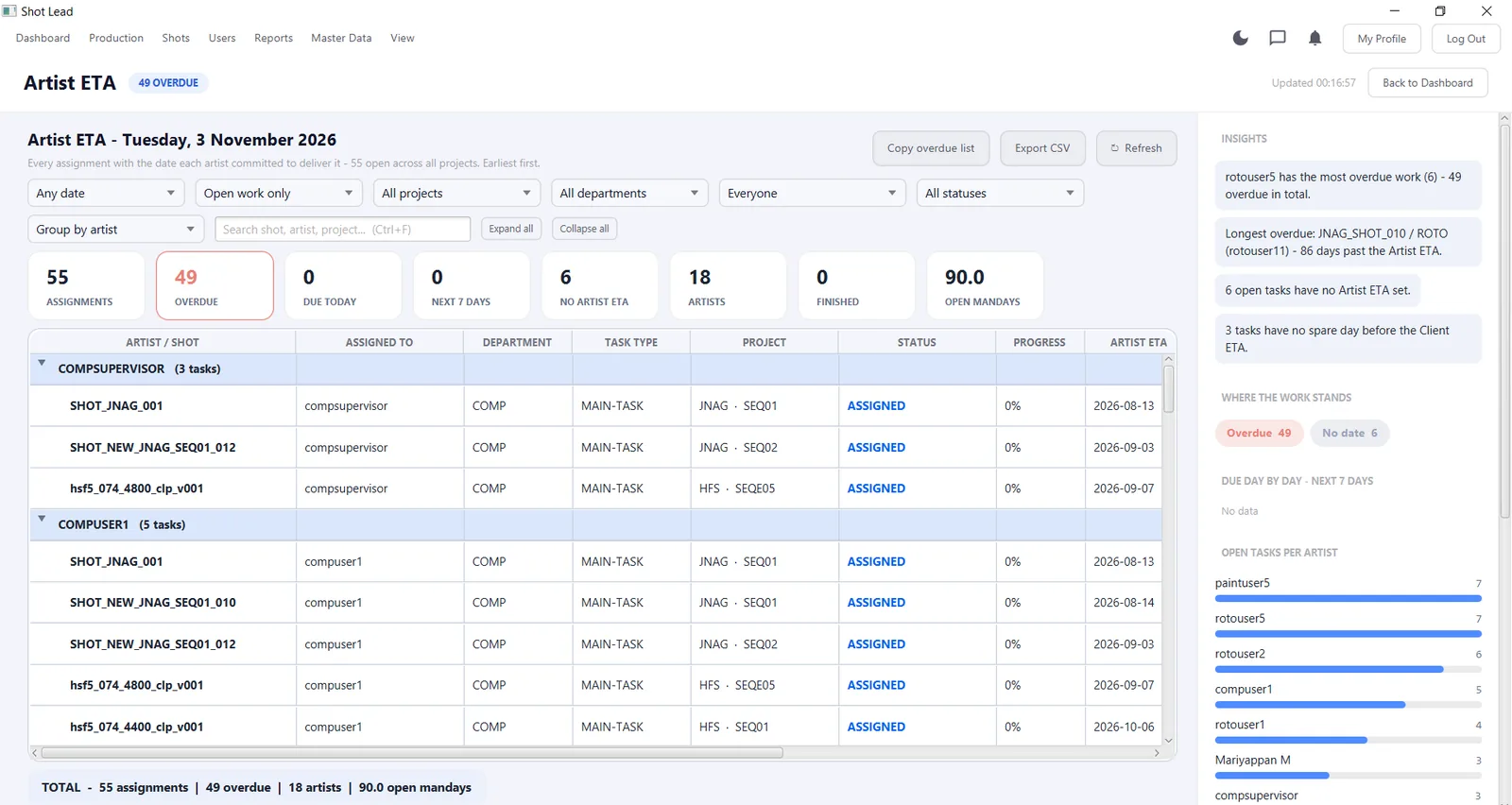
Artist ETA
The date each artist committed to, what is due today and in the next 7 days, and open tasks per artist.
Install in minutes on every workstation
Install ShotLead on each supervisor's and artist's PC. Everyone connects to the same ShotLead server, so the whole team sees live data, without passing spreadsheets around.
We help you set up your studio: users and roles, departments, task types, statuses and your first projects.
| Operating system | Windows 10 or Windows 11 |
|---|---|
| Installer | ShotLeadSetup-1.0.0.exe · 63 MB |
| Version | 1.0.0 (November 2026) |
| Network | Connection to the ShotLead server |
| Screen | Full HD (1920 × 1080) recommended |
| Optional | RV player for Play in RV · shared network drive for EXR and MOV files |
| User roles | Administrator, supervisor and artist accounts |
Download ShotLead for Windows
Tell us a little about your studio and the download starts immediately. We'll also email you the link and help you set up your studio account.
Your download is starting
If it doesn't start automatically, use the button below. We've also emailed you the link.
Download ShotLeadSetup-1.0.0.exe- Open ShotLeadSetup-1.0.0.exe from your Downloads folder.
- If Windows shows "Windows protected your PC", click More info → Run anyway.
- Follow the setup wizard, then open ShotLead from the Start menu.
- Sign in with the account we create for your studio. We'll contact you shortly.
What you get
- ShotLead desktop app for Windows 10 & 11
- Help setting up your studio account, users and departments
- A free live demo for your supervisors and coordinators
- Direct support from our team in Chennai
c30aa2106754b05a88a8c42eeceedef4eec00d80c0edae8e70276fcd4e147557
Frequently asked questions
What is ShotLead?
ShotLead is a production tracking application for VFX studios, built by Sparkglow Technologies, Chennai. It tracks projects, shots, artist assignments, time logged, reviews, client ETAs and outsourced work in one Windows desktop app.
Which departments does ShotLead support?
ShotLead is built around VFX work types such as ROTO, PAINT, COMP, MATCH MOVE and 3D. Departments, task types and statuses are managed in Master Data, so you can match them to your own pipeline.
How do artists log their time?
Artists log time against the tasks assigned to them. ShotLead compares the hours logged with the man-days planned for each shot, and shows the results in the monthly, artist performance and time reports.
Can ShotLead track outsourced shots?
Yes. You can add partner studios and freelancers as vendors, mark work as outsourced, and follow it by client ETA month. Outsourced work appears separately in the reports, with a vendor scorecard.
Can I export data to Excel?
Yes. Shot lists can be exported to Excel and the reports can be exported to CSV. Several reports also have one-click copy buttons for a month summary or a chase list to share with your team.
Does ShotLead work with RV?
Yes. Each shot can store its EXR folder and QT / MOV path on your shared drive. If RV is installed on the workstation, the Play in RV button opens the media directly.
What do I need to run ShotLead?
A Windows 10 or Windows 11 PC and a network connection to the ShotLead server. The installer is about 63 MB. RV and a shared drive are optional, for media playback.
Windows shows "Windows protected your PC". Is it safe?
Yes. This message appears for new software from smaller publishers. Click "More info" and then "Run anyway". You can confirm the file is genuine by comparing its SHA-256 checksum with the one shown on this page.
How much does ShotLead cost?
Pricing depends on the number of users and the setup your studio needs. Download the app or contact us for a quote and a free live demo.
Ready to stop chasing shots on spreadsheets?
Download ShotLead or book a 30-minute demo with your own projects and workflow.